Invite friends
bemy.fans is better with people you know, and creators can bring their fans with them. You can share a personal invite link, or have bemy.fans send an invitation by email.
Share your invite link
- Go to Settings and find Invite friends. (It's also a step in the setup guide.)
- Under Your invite link, tap Copy, or Share to send it straight from your phone.
- Send it by text or DM, or share it wherever your fans already follow you.
Anyone who signs up through your link shows as invited by you, and you get an alert when they join. The card shows how many people have joined so far. Your link keeps working, with no daily limit.
Invite by email
- Under Invite by email, type a friend's email address. Tap + Add another to invite a few at once.
- Tap Send invitation (or Send 2 invitations, and so on).
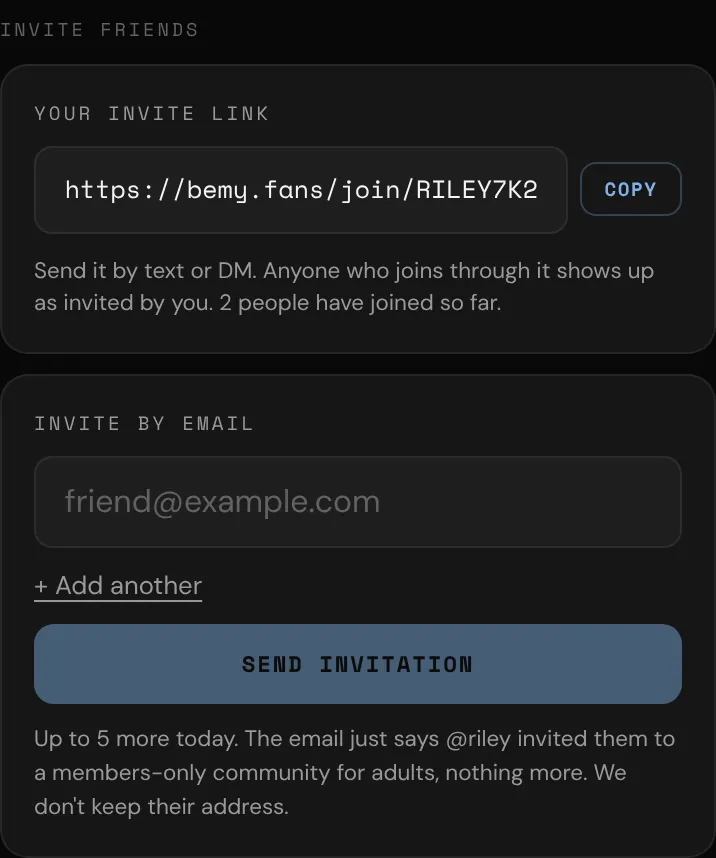
You can send up to 5 email invitations a day. The email says that you (with your @username) invited them to bemy.fans, that it's for adults (18+), and has an Accept invitation button. bemy.fans doesn't keep their address.
Good to know
- If the address already belongs to a member, or the person asked not to get invitations, nothing is sent. You won't be told which, and it still counts toward your 5.
- Each invitation has a Don't send me invitations link. Anyone who uses it never gets another bemy.fans invitation, whoever tries to invite them.
- Inviting the same address twice doesn't send a second email, and doesn't count toward your 5.