Share to X and Bluesky
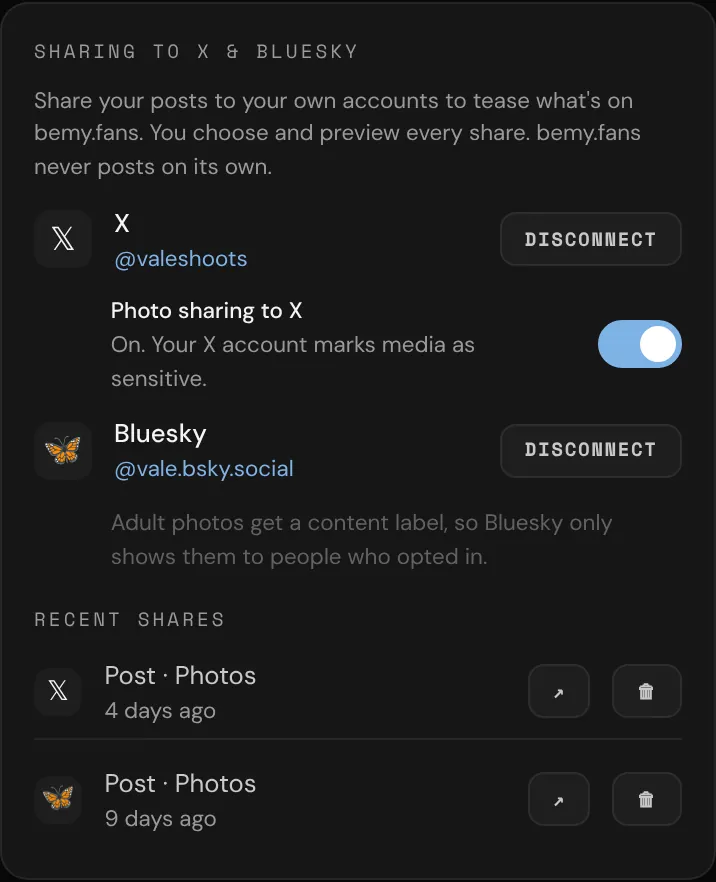
Your future fans are already on X and Bluesky. Share your bemy.fans posts there to tease what's new and bring people back to you here.
You choose and preview every share. bemy.fans never posts anything on its own. Sharing is for creators, because creators are the ones who post: the Sharing to X & Bluesky card in Settings only shows on creator accounts.
Connect an account
You need a confirmed email address first.
- Open Settings and find Sharing to X & Bluesky.
- For X, tap Connect, sign in to X and allow access. You come back to Settings and see "X connected". If it says Not available on bemy.fans yet under X, use Bluesky for now.
- For Bluesky, tap Connect and follow the steps shown:
- On Bluesky, go to Settings → Privacy and security → App passwords and add an app password named "bemy.fans" (leave direct messages off).
- Back in bemy.fans, enter your Bluesky handle and the App password. It looks like
xxxx-xxxx-xxxx-xxxx. - Tap Connect Bluesky.
Never use your main Bluesky password. You can revoke the app password on Bluesky at any time.
Share a post
You can share your own posts:
- Tap ↗ Share under the post, or ••• then ↗ Share to X or Bluesky.
- Right after you post, you see "✓ Posted. Share it to X or Bluesky too?" if you have an account connected. Tap ↗ Share.
Activity posts and posts with a video can't be shared.
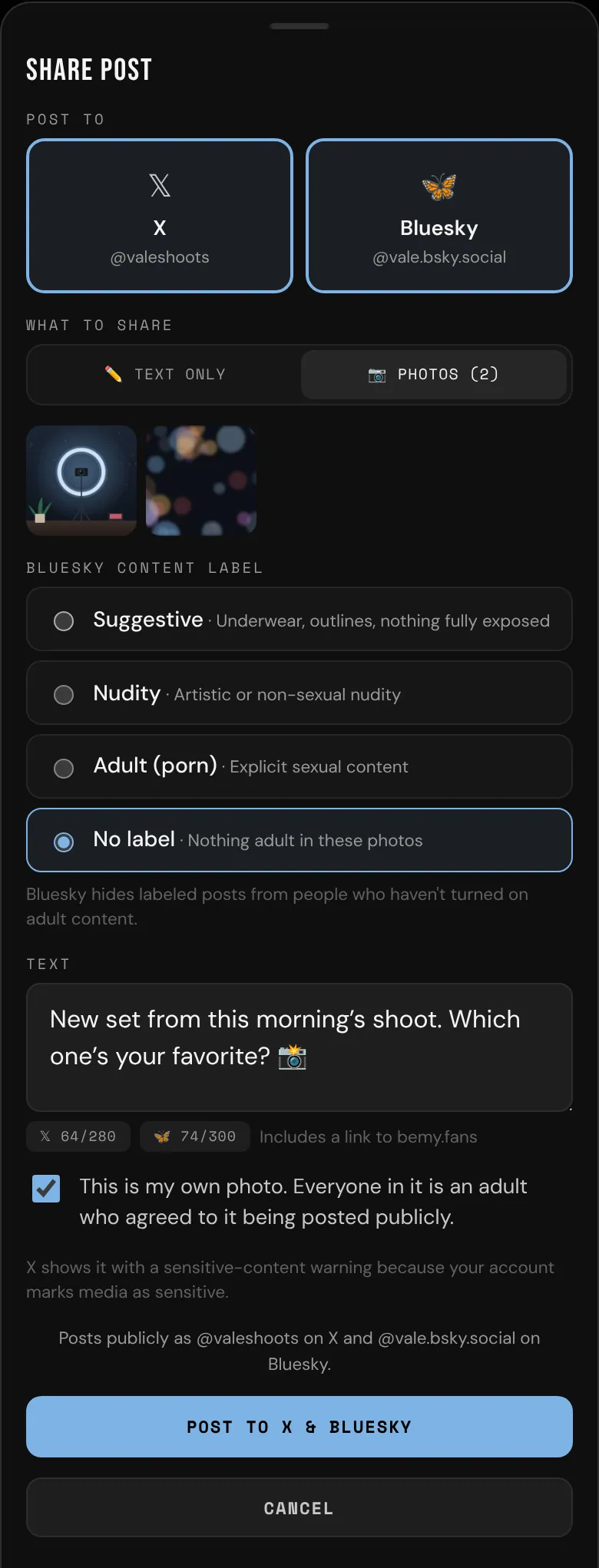
In the Share post sheet:
- Under Post to, pick X, Bluesky or both.
- Under What to share, pick 📷 Photos or ✏️ Text only. A post without photos is always shared as text. X and Bluesky take up to 4 photos, so the first 4 are shared.
- Edit the Text. It starts as your post's text. The counters show the length against each site's limit: 280 on X, 300 on Bluesky. When you see Includes a link to bemy.fans, a link to bemy.fans is added at the end. If you're asked to remove a link, that's because bemy.fans can't include links in X posts.
- Tap Post to X, Post to Bluesky or Post to X & Bluesky.
When it's done you see Shared, with Open ↗ to see it on each site.
Sharing photos
- You need a verified ID to share photos. If you haven't verified, tap Verify now in the sheet (see Verify your ID).
- Before you post, tick This is my own photo. Everyone in it is an adult who agreed to it being posted publicly.
- Bluesky: under Bluesky content label, pick Suggestive, Nudity or Adult (porn). Bluesky hides labeled posts from people who haven't turned on adult content. No label is only offered when none of the photos is marked as sensitive.
- X: X only allows adult photos from accounts that mark their media as sensitive. On X, go to Settings and privacy → Privacy and safety → Your posts and turn on "Mark media you post as containing material that may be sensitive". Then, in bemy.fans Settings, turn on Photo sharing to X, tick I've turned this on, and tap Turn on photo sharing. X then shows your photos with a sensitive-content warning.
Delete a share
- In Settings, under Sharing to X & Bluesky, find it in Recent shares (tap Show all if needed).
- Tap 🗑, then Delete post.
It's removed from your X or Bluesky account, with its likes and replies. Deleting a post on bemy.fans also deletes the copies you shared.
Disconnect
Tap Disconnect next to the account, then Disconnect again. bemy.fans loses access straight away. Posts you already shared stay on X or Bluesky, and bemy.fans can't delete them after you disconnect, so delete them first if you want them gone. The same goes before you delete your bemy.fans account. If you've switched to a fan account, switch back to a creator account to see the card again.
If an account shows needs reconnecting, tap Reconnect.