Comments, likes and reactions
React to a post
Every post has four reactions under it: ❤️ 🔥 😮 👏. Tap one to add it, and tap it again to take it back. You can use more than one on the same post. The number next to each one shows how many people chose it.
Reactions don't send anyone a notification.
Comment on a post
- Tap 💬 under the post. The number next to it is how many comments there are.
- Type in the box that says Add a comment… (@ to mention).
- Tap Post.
Comments can be up to 1,000 characters. Web links in a comment become clickable. Your very first comment earns the Joined in achievement (see Achievements).
Reply to a comment
- Tap Reply under the comment.
- A reply box opens with "Replying to @alex". When you reply to someone else, their @username is already filled in.
- Write your reply and tap Reply. Tap Cancel if you change your mind.
Replies sit in a thread under the first comment, and replying to a reply joins the same thread. A long thread shows its first two replies: tap View 2 more replies (or however many there are) to see the rest, and Hide replies to fold them away again.
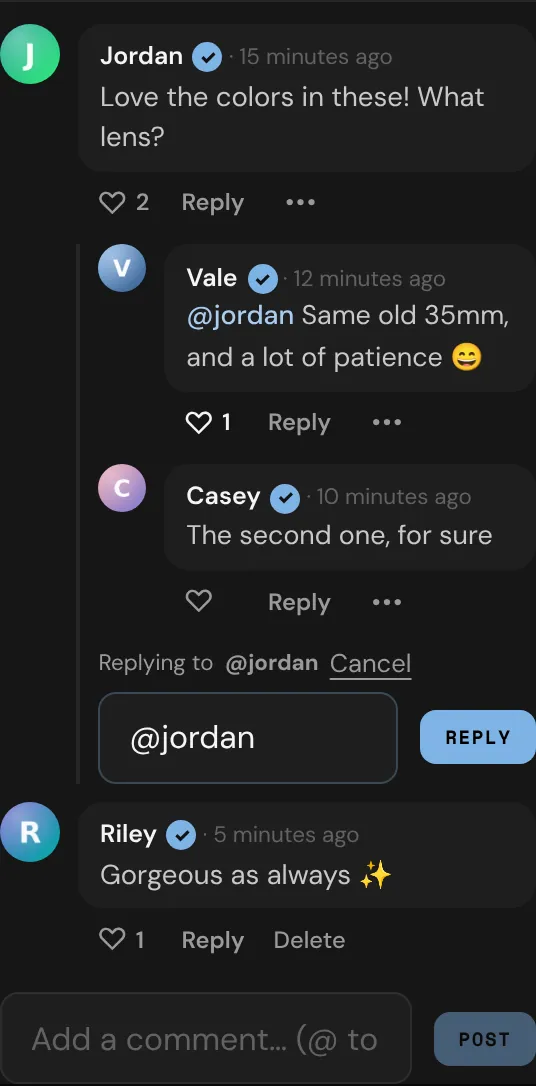
Like a comment
Tap ♡ under a comment to like it. It turns into ♥ with the number of likes. Tap it again to unlike.
Mention someone
Type @ and the start of a username, then pick the member from the list. Their name becomes a link to their profile, and they get a notification if they can see the post. A fan's mention only notifies creators: if you're a fan and you mention another fan, they aren't told.
Delete a comment
You can delete your own comments, and any comment on your own posts. Creators can use this to keep their comments friendly.
- Tap Delete under the comment.
- Tap Delete again to confirm.
Deleting a comment also deletes its replies; the confirmation tells you how many. Comments can't be edited, so to fix one, delete it and write it again.
For someone else's comment, tap ••• next to it to 🚩 Report or ⛔ Block them. See Privacy and safety.
Notifications
You hear about these in Alerts, and by push notification and email if you've turned those on:
- Someone comments on your post or your activity, or replies to a comment under it.
- Someone replies to your comment.
- Someone mentions you in a post or a comment.
Likes on your comments show up in Alerts only, with no push or email, and only once per person for each comment. Tap a notification to open the post with that comment highlighted.