Privacy and safety
Who can see what
- Profiles, posts and the feed are only visible to signed-in members.
- Your email, and the legal name and birthday from ID verification, are never shown to other members.
- When creators post, they choose who sees it: All members or Followers only. See The feed and your posts.
- Who follows a creator is private: only that creator can see their followers list. Everyone else just sees how many followers they have.
- The creators a fan follows are only visible to that fan. The creators a creator follows are public. See Following and followers.
- A fan's profile is simple: it has no posts or photos, and no follower or following counts for others to see. See Your profile.
- When you go live, you choose who's told about it. Anyone signed in who has the link can watch, and with a 🌐 Public link, people without an account can watch too, after confirming they're 18+. See Go live and Public live links.
Privacy settings
Go to Settings. In Profile & privacy:
- Show sensitive photos without blur: photos members mark as containing nudity stay blurred until you tap them, unless this is on.
- Ask before showing private photos and videos: photos and videos in messages and reports stay hidden until you tap View, so you can open alerts safely in public. It's on to start with.
- Suggest me to other members (creators): lets your profile appear in "Suggested for you". Members can still find you by searching your name. Only creators are suggested, so fans don't see this one. See Find creators and members.
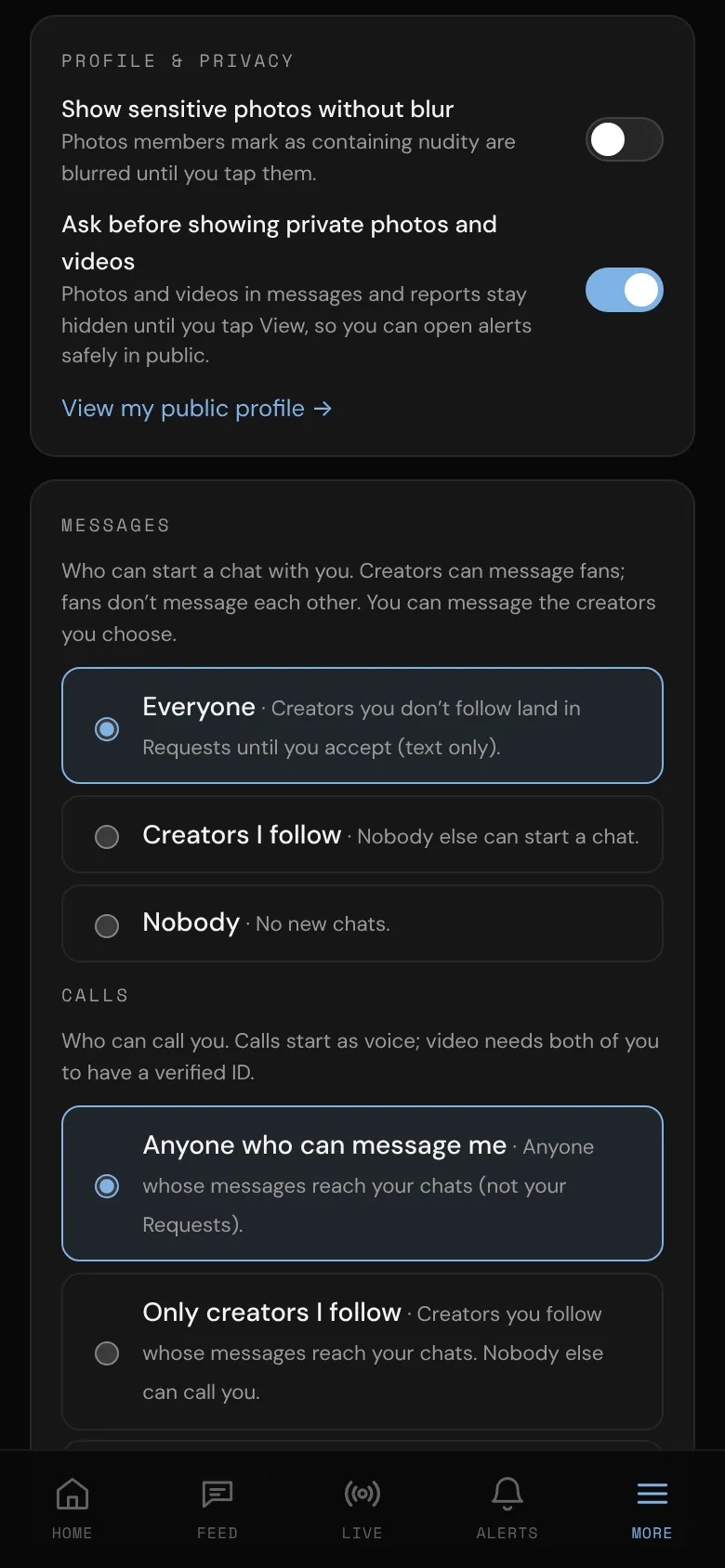
In Messages, choose who can start a chat with you: Everyone, People I follow (for fans, Creators I follow) or Nobody. With Everyone, people you don't follow land in Requests until you accept. People you follow who follow you back can always message you. Fans can't be messaged by other fans: fans message creators, and creators can message anyone. Creators also choose here whether Fans can send me video messages. See Private messages.
In Calls, choose who can call you: Anyone who can message me, Only mutuals (for creators: people you follow who follow you back) or Only creators I follow (for fans), or Nobody. Two fans can't call each other. See Voice and video calls.
Creators: in Activity in the feed, choose who sees your achievements, lives and events as feed posts: Followers, All members or Off. See Activity in the feed.
Keep it discreet on this device
In This device (these only change the phone or computer you're using):
- Hide explicit branding: shows a neutral "bm" name and tab title.
- Blur all images: every photo in the feed, profiles and galleries stays blurred until you tap it.
- Share anonymous usage stats: tells bemy.fans which pages and features get used, never your name, messages, photos or who you talk to. Switch it off if you'd rather not.
For your inbox, turn on Discreet emails. See Email preferences.
Protect what you share
- Every live shows each viewer's own @username faintly over the video, which discourages screen recording.
- Snaps can only be opened once (members on Plus or Pro can replay a snap once). See Photos, snaps and video messages.
- Recording or screenshotting someone's lives, calls or private photos to share elsewhere without their consent breaks the rules. Report it if it happens to you.
These protections lower the risk, but they can't remove it: anyone who can see something could still save it. Only share what you're comfortable with the people you chose seeing.
Safety tools that are always there
- Block and report anyone who makes you uncomfortable. See Block and report.
- Messages and Calls settings decide who can reach you.
- In your own lives you decide who's on camera and who stays. See Live safety.
- Contact support for anything else. See Contact bemy.fans Support.
Adults only
bemy.fans is only for adults: 18 or older, or the age of majority where you live.
- Everyone confirms they're 18 or older when they sign up.
- Going live, coming on camera, video calls, sending photos in messages, posting videos, starting group chats, hosting events and sharing photos to X and Bluesky all need a verified ID. See Verify your ID.
- If you think someone is under 18, report them with Appears to be under 18. These reports are treated as urgent.
- A bio, name, post or comment that says the writer is under 18 alerts the admins.
- If a member's ID, or the birthday they give, shows they're under 18, their account is flagged for admins, who suspend or delete it. Their ID photos are deleted.
- In some US states, the law asks bemy.fans to check members' ages. Members connecting from those states verify their ID before they carry on. See Age checks in some US states.
- ID photos and selfies are deleted 30 days at most after a check is decided. See What's kept, and for how long.
How you found bemy.fans
When you join, bemy.fans notes how you found it, to see what's working:
- the site that sent you, by name only (like google.com or x.com), never the page you were on,
- any campaign tags in the link you followed (like utm_source=instagram),
- the first bemy.fans page you opened, and whether you came with an invite.
That's all. It's never shown to other members, and bemy.fans only uses it in totals, like how many people joined from search engines this month.
The rules everyone agrees to
Every member agrees to the Terms of Service, the Acceptable Use Policy and the Content and Model Release. They say what's allowed, and that everyone who appears in what you post is an adult who agreed to it, shown to the people you choose. See Terms and policies.