Private messages
Messages are private one-to-one chats. Fans message creators, and creators can message anyone, fans and other creators. Creators can also start group chats of up to 20 people and invite fans to them. See Group chats.
Open Messages
- On a phone: tap the speech-bubble icon at the top of your Home or the Feed. It's also under More → Messages.
- On a computer or tablet: choose Messages in the menu on the left.
The number on the icon counts chats with unread messages, plus message requests.
Your inbox has two tabs, Chats and Requests. bemy.fans Support is pinned first: tap it to ask the bemy.fans team a question or report a bug. See Contact support. Your other chats follow, newest first. A chat with someone you follow who follows you back says You follow each other.
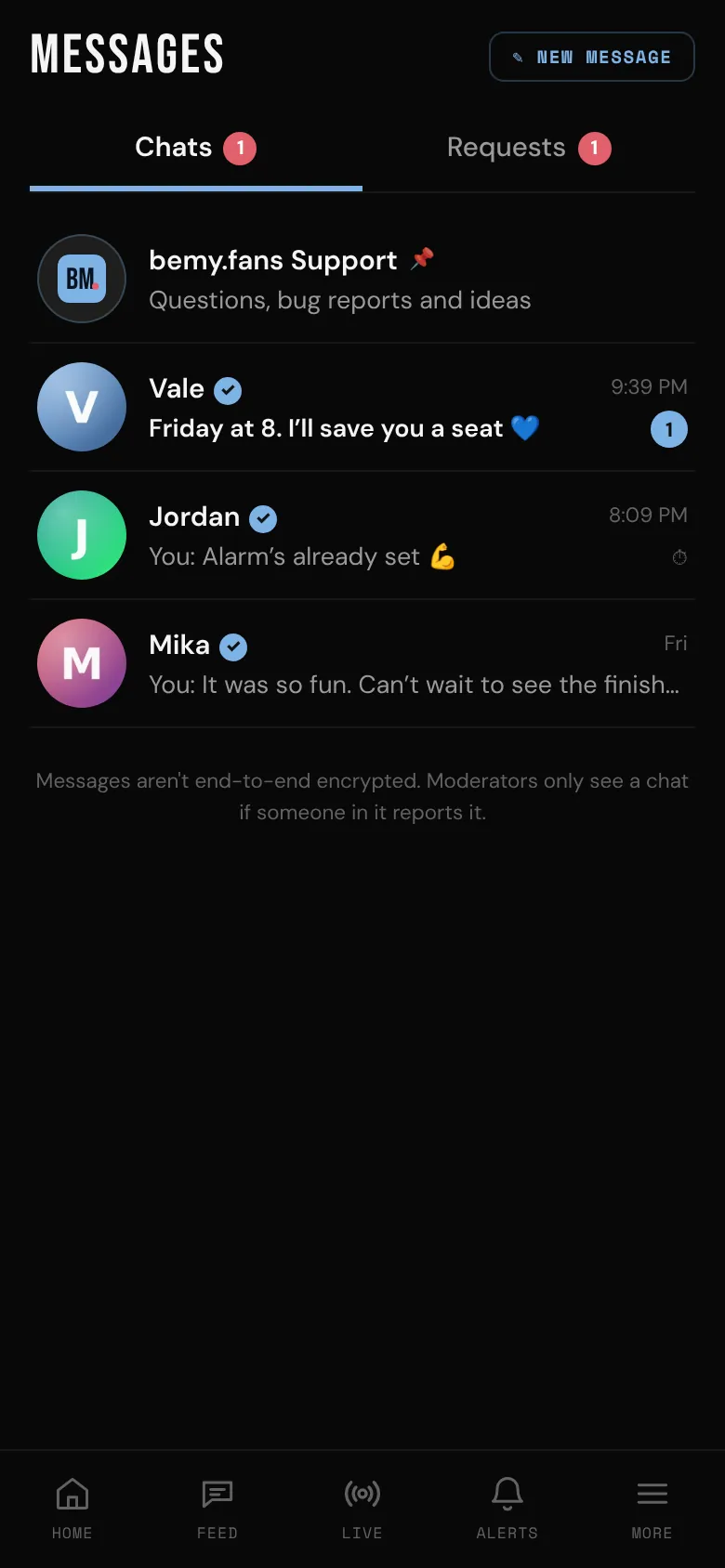
Who can message whom
- Fans message creators. Two fans can't start a chat with each other: you see "Fans can message creators, not other fans". A chat two fans had before stays readable, but neither of them can write in it.
- Creators can message anyone, fans and creators, as long as that person's setting allows it (see Who can message you below).
- A fan's first messages to a creator land in the creator's Requests until they accept. See Message requests below.
Start a chat
- Tap ✎ New message.
- Search by name or @username, and tap the person. As a fan, you search for creators: "You can message creators. Search for one by name or @username."
- Type your message and tap send.
You can also tap Message on someone's profile. A message can be up to 2,000 characters, and you can start up to 20 new chats a day. On a computer, Enter sends and Shift+Enter starts a new line.
Creators can chat with several people at once: tap ✎ New message, then New group. See Group chats.
Who can message you
People you follow who follow you back (mutuals) can always message you. For everyone else, choose in Settings, under Messages.
If you're a creator:
- Everyone (the default): people you don't follow land in Requests until you accept, and can only send text.
- People I follow: nobody else can start a chat.
- Nobody: no new chats.
If you're a fan, only creators can start a chat with you:
- Everyone (the default): creators you don't follow land in Requests until you accept, and can only send text.
- Creators I follow: nobody else can start a chat.
- Nobody: no new chats.
Whatever you choose, you can still start chats yourself: fans with creators, and creators with anyone whose own setting allows it.
Message requests
When someone you don't follow writes to you, the chat goes to Requests:
- They can send up to 3 messages until you accept, and only text.
- They can't see that you've read their messages.
- Tap Accept, or just reply, to move it to Chats.
- Tap Delete to remove it. They aren't told.
- Tap Report / Block if it's unwanted.
It works the same the other way. When you write to someone who doesn't follow you, your first messages go to their Requests, and the chat tells you how many more you can send until they accept. Creators can't follow fans, so a fan's first messages to a creator always start as a request.
Invites to group chats wait in Requests too, until you accept or decline them.
In a chat
- Tap a message to see its time, react (❤️ 🔥 😮 👏 😂), Copy it, or Unsend one of yours. Unsending removes it for both of you.
- Under your last message you'll see Sent, then Seen once they've read it.
- Tap Load earlier messages at the top for older ones.
For photos, view-once snaps, video messages and disappearing messages, see Photos, snaps and video messages.
Calls and voice messages
Tap the phone at the top of a chat for a voice call, or the camera for a video call. Video needs both of you to have a verified ID. The buttons are there when your messages reach their chats and they take calls from you. Calls follow who can message whom, so two fans can't call each other.
Your calls show up in the chat: Voice call with how long you talked, Missed video call, No answer, and so on, each with Call back or Call again. A missed call counts as unread. A call you had or declined doesn't.
When nobody answers, the caller can leave a voice message (or a video message, if they've verified their ID) of up to a minute. A fan can leave a creator a video message only if the creator takes video messages from fans. It shows in the chat with a play button. See Voice and video calls.
Video messages
Tap the video camera next to the message box to record a video message of up to 2 minutes, watch it back, then Send. It needs a verified ID and can't go in a message request. Video messages are kept 7 days and can't be downloaded. See Photos, snaps and video messages.
- Creators can send video messages to anyone they can message.
- Fans can send a creator a video message only if that creator has turned on Fans can send me video messages. If they haven't, the video camera button is dimmed, and tapping it says "@vale doesn't take video messages from fans". This setting doesn't change text, photos, snaps or voice messages from fans.
For creators: video messages from fans
Video messages from fans are off to start with. To take them, open Settings, go to Messages and turn on Fans can send me video messages. It's for fans whose messages you've accepted, and you can turn it off again any time.
Chat options
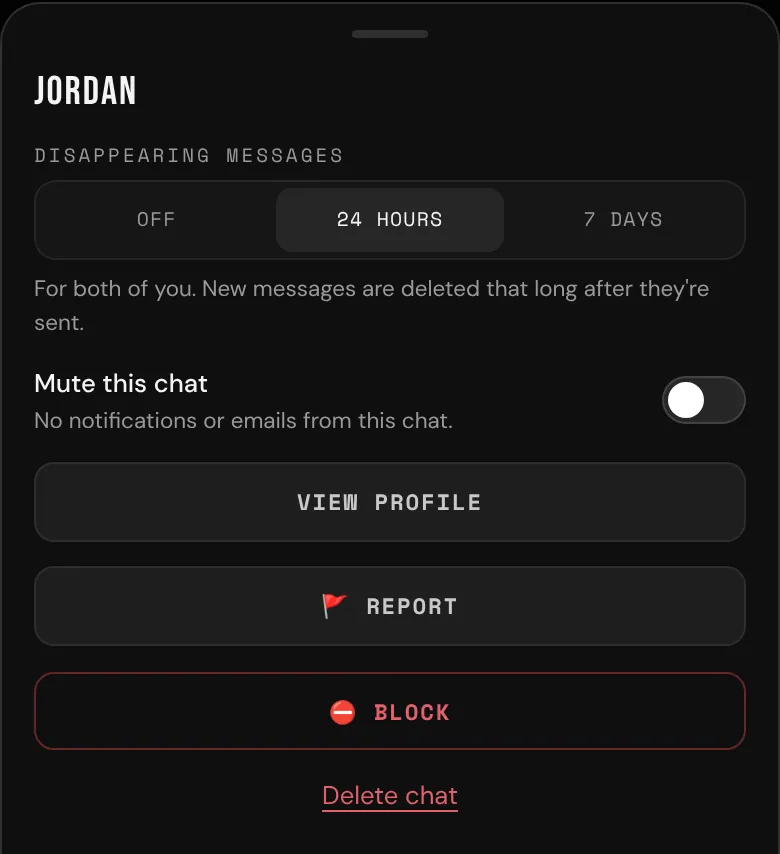
Tap ••• at the top of a chat:
- Disappearing messages: Off, 24 hours or 7 days, for both of you. See Photos, snaps and video messages.
- Mute this chat: no notifications or emails from it.
- View profile
- 🚩 Report: pick a reason, add what happened if you like, and tap Send report. Moderators see the latest 50 messages in the chat (including ones you deleted, and the calls), and copies of the photos, snaps and voice or video messages the other person sent. Also block @username (with their username) is ticked unless you untick it.
- ⛔ Block: tap Block to confirm. They can't message or call you, you stop following each other, and you won't see each other's profiles, posts or comments. Any call between you ends. They aren't told. You can unblock them in Settings, under Blocked.
- Delete chat: removes the messages so far for you only. They keep their copy. If they write again, the chat comes back without the old messages.
More on staying safe: Block and report and Privacy and safety.
Notifications and emails
- Push notifications say who wrote and "Sent you a message" (or "Left you a voice message"), never what it says. Messages don't appear in Alerts.
- If messages wait unread for 30 minutes while you're away from bemy.fans, you get an email saying how many and from whom, never what they say. You get at most one every 6 hours. Turn it off in Settings, under Email → Messages and calls. See Email preferences.