Group chats
Group chats are invite-only chats for up to 20 people, invites included. They live in Messages next to your private chats.
Creators start groups and run them. Fans can be invited to a creator's group and chat in it, but don't start groups of their own.
Start a group
Starting a group is for creators, and you need a verified ID. See Verify your ID.
- In Messages, tap ✎ New message, then New group.
- Under Group name, give the group a name (up to 60 characters).
- Under Invite people, tick the people you want to invite. Search by name or @username to find someone.
- Tap Start group. The button shows how many people you picked.
Everyone you picked gets an invite in their Requests.
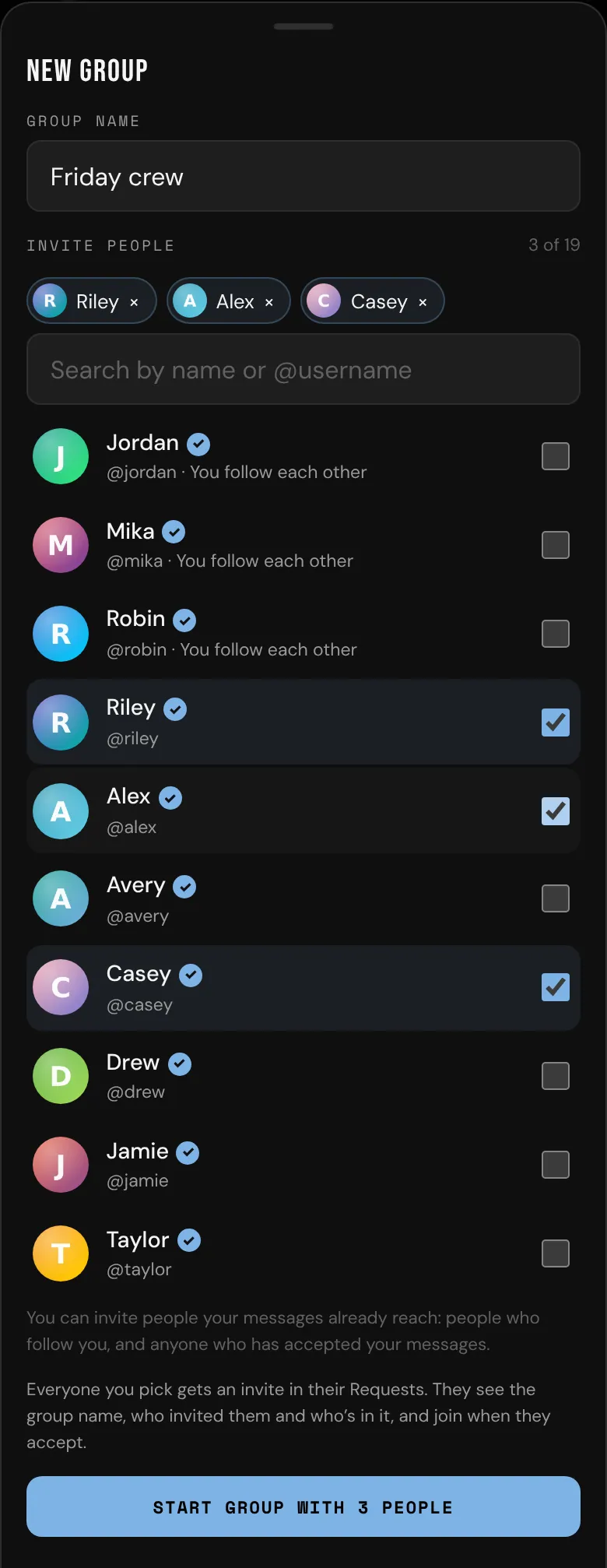
You can invite people your messages already reach: mutuals (you follow each other), people who follow you, and anyone who has accepted your messages or written to you. You can't invite someone you've blocked or who has blocked you. You can start up to 10 groups a day.
Fans don't see New group. If you're a creator and you don't see it, group chats are turned off on bemy.fans right now.
Group invites
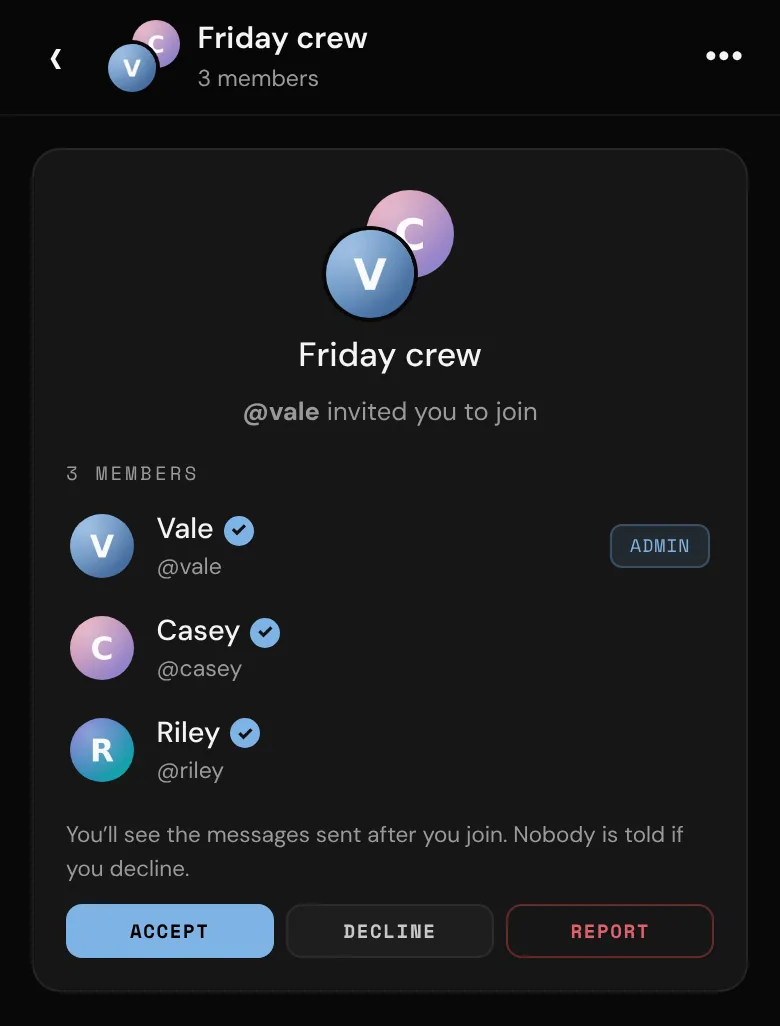
An invite goes to your Requests tab, and you get a notification, like @vale invited you to “Friday crew”. Open it to see the group's name, who invited you and who's in it. You don't see any messages until you join.
- Tap Accept to join. Everyone sees that you joined, and you see the messages sent from then on (not the ones from before you joined).
- Tap Decline to remove the invite. Nobody is told, and that group can't invite you again for a week.
- Tap Report if the invite is unwanted.
In a group
- Write as in a private chat. Other people's messages show their name and picture.
- Send photos with the photo button next to the message box. Photos need a verified ID, and they're kept as long as your plan keeps them.
- Video messages in group chats are for creators, with a verified ID. They're kept for 7 days. Someone without a verified ID verifies before they can watch one.
- Tap a message to react (❤️ 🔥 😮 👏 😂), Copy it, or Unsend one of yours. Unsending removes it for everyone.
- Groups don't have snaps, calls or voice messages, and there's no Seen.
For how photos, video messages and disappearing messages work, see Photos, snaps and video messages.
Group info
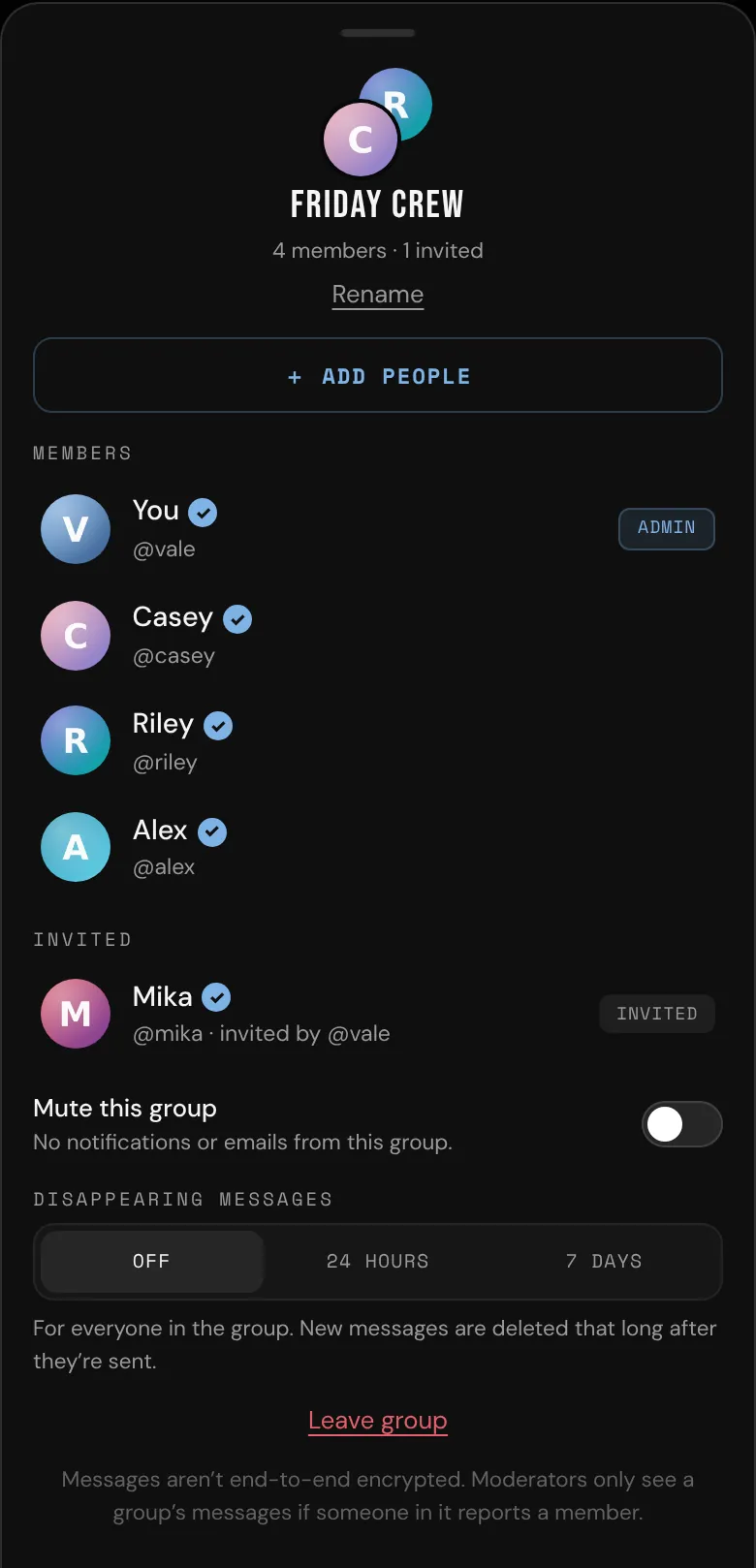
Tap the group's name at the top of the chat (or •••) to open Group info:
- Members, with an Admin chip next to the group's admins, and anyone still Invited.
- Mute this group: no notifications or emails from it.
- Disappearing messages: Off, 24 hours or 7 days. Admins choose this for everyone.
- Leave group
Tap a member to View profile or 🚩 Report them.
For admins
The creator who starts a group is its first admin. Only creators can be group admins or add people: making a fan an admin says "Only creators can be group admins. @alex is a fan." Admins can:
- + Add people: pick from the people your messages reach, as when you start a group. They get an invite in their Requests.
- Remove from group, or Cancel invite for someone who hasn't joined yet. They aren't sent anything. The group just leaves their inbox.
- Make admin or Remove as admin (for other creators in the group). A group always keeps at least one admin.
- Rename the group, then tap Save name.
- Turn disappearing messages on or off.
Everyone in the group sees a line in the chat when someone joins, leaves or is removed, is made an admin, or when the name or disappearing messages change.
Leave a group
- Open Group info and tap Leave group.
- Tap Leave group again to confirm.
The group leaves your inbox and you stop getting its messages. What you wrote stays in the group. That group can't invite you again for a week.
- If you're the only admin, the creator who's been in the group longest becomes admin.
- If you're the only creator in it, the group becomes read-only for everyone else.
- If you're the last one in it, the group and its messages are deleted.
A group with no creator in it
A group needs a creator in it. If the last creator leaves, or switches to a fan account, the group becomes read-only, and everyone in it sees "This group has no creator in it any more, so it's read-only." You can still read it, and leave it.
Blocking and reporting
If you block someone who's in one of your groups (or they block you), you don't see each other's messages or reactions in it, and the group carries on for everyone else. Your member list marks the people you've blocked. Block someone from their profile. See Block and report.
To report someone, tap them in Group info, then 🚩 Report. Moderators see the latest 50 messages of the group since you joined (marking which are theirs), and copies of the photos and video messages they sent. The copies are deleted 90 days after the report is closed.
Notifications and emails
- Push notifications say New message in “Friday crew” (with the group's name) and who wrote, never what they wrote. You get one notification per group on your phone, and none from groups you've muted.
- Unread group messages count in your Messages badge and in the unread-messages email, which says who wrote, never what. See Private messages.