Email preferences
bemy.fans emails you about what matters to you, and you choose which kinds. Emails only go to a confirmed address, so confirm your email first.
Choose your emails
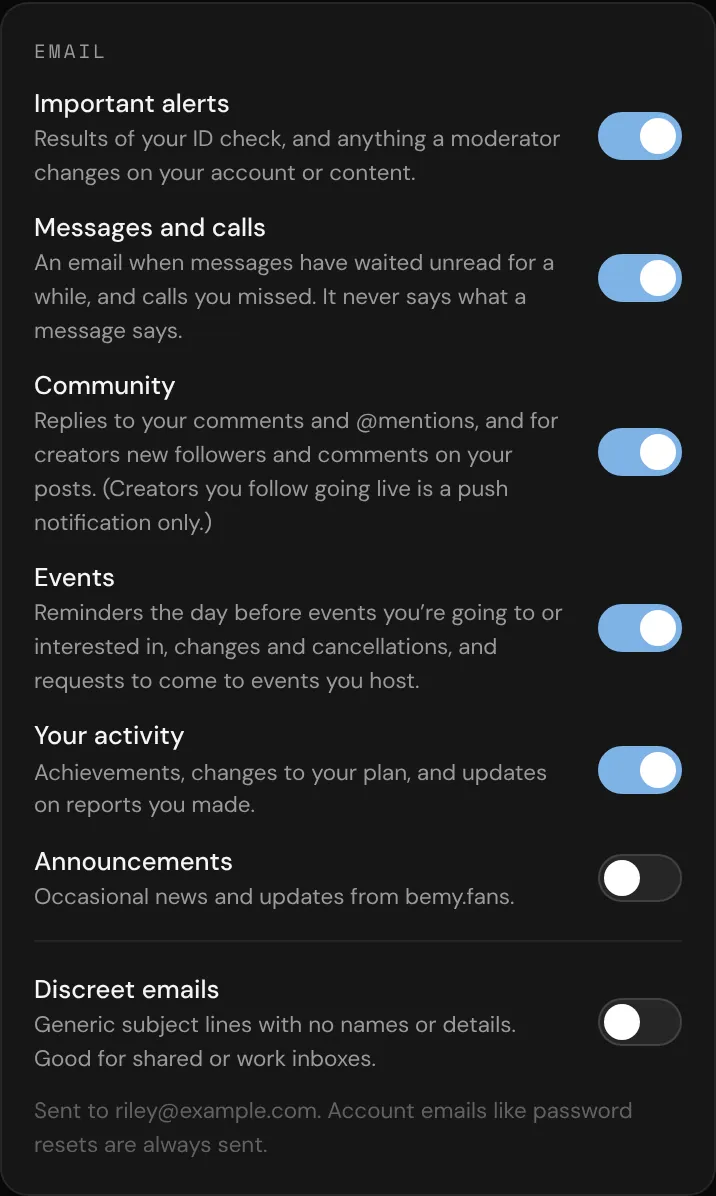
- Go to Settings and scroll to Email.
- Switch each kind on or off. Changes save straight away.
Every kind starts switched on:
- Important alerts: the results of your ID check, and anything a moderator changes on your account or content.
- Messages and calls: an email when messages have waited unread for a while, and calls you missed. It never says what a message says.
- Community: replies to your comments and @mentions, and for creators, new followers and comments on your posts. (Creators you follow going live is a push notification only.)
- Events: reminders the day before events you're going to or interested in, changes and cancellations, and requests to come to events you host.
- Your activity: achievements, changes to your plan, and updates on reports you made.
- Announcements: occasional news and updates from bemy.fans.
To quiet a single chat instead, open it, tap ••• and switch on Mute this chat (in a group chat, Mute this group). That stops its notifications and emails. See Private messages.
Discreet emails
Switch on Discreet emails in the same card for generic subject lines with no names or details. It's good for shared or work inboxes. Each email just says you have a new notification, and you sign in to see what it is.
Unsubscribe from an email
Every notification email has links at the bottom:
- Email preferences opens these settings.
- Unsubscribe from … (for example, "Unsubscribe from community") turns off just that kind. Tap it, then tap Unsubscribe on the page that opens.
Unsubscribing only stops the emails. You still see the same notifications in Alerts, and as push notifications if they're on. Turn a kind back on any time in Settings → Email.
Emails that always send
Account emails can't be switched off. They are:
- confirming your email address, and reminders to do it;
- password reset links, and notices that your password was changed;
- notices about your account being suspended;
- a request to verify your ID again, if bemy.fans ever needs one (see Verify your ID).