Your profile
Your profile is your page on bemy.fans. For creators, it's where fans find out who you are and what you make. For fans, it's how creators get to know you, and it's kept simple: your picture, name, bio and links.
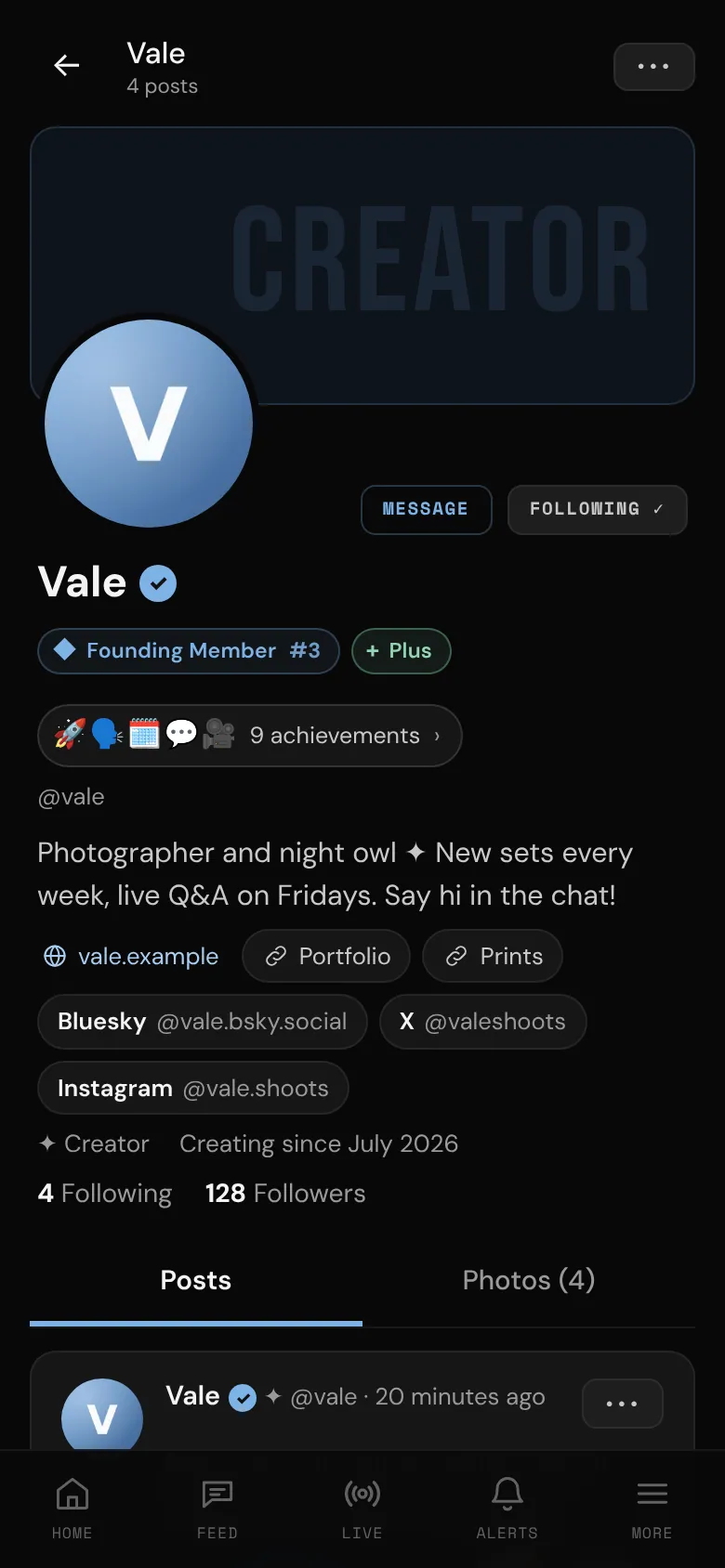
To open your profile on your phone, tap More in the tab bar, then your name at the top. On a computer, tap your name at the top of the side menu and choose Profile. Only signed-in members can see profiles.
Edit your profile
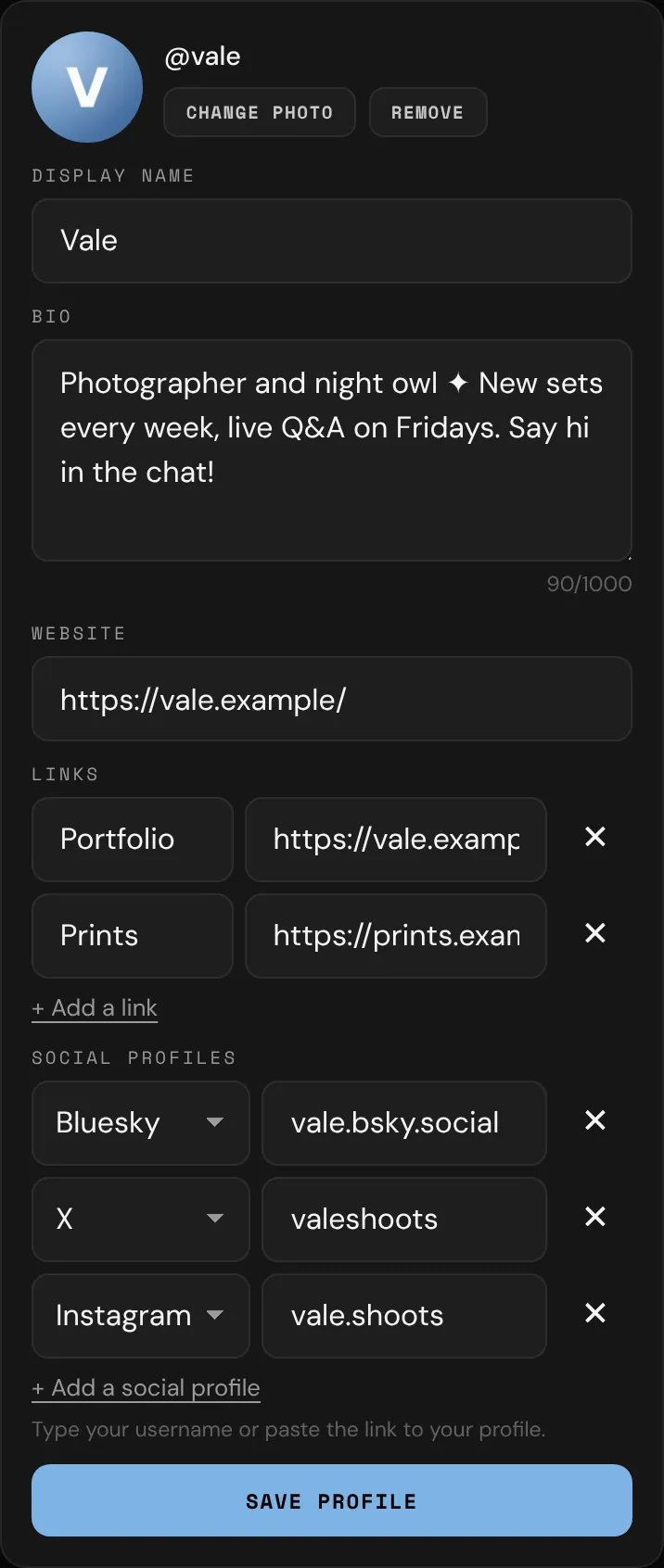
- On your profile, tap Edit profile. This opens the top of Settings.
- Change what you like:
- Change photo: pick a picture, crop, zoom or rotate it, and tap Save photo. Your profile photo shows everywhere, so keep it non-explicit. Remove takes it off.
- Display name: up to 40 characters. Leave it empty and people see your @username instead.
- Bio: up to 1,000 characters. Creators, tell fans what you make, when you go live and what they get for following you. @mentions and web links in your bio become clickable. Long bios are folded behind Show more.
- Tap Save profile.
Website, links and social profiles
These are in the same form, under your bio:
- Website: your main site.
- Links: up to 5 more (a blog, a wishlist, anything). Tap + Add a link, give it a label if you like, and paste the address.
- Social profiles: tap + Add a social profile, pick the site, and type your username or paste the link to your profile. You can add one each of X, Bluesky, Instagram, Threads, TikTok, Reddit, Telegram, YouTube, OnlyFans and Mastodon. For Mastodon, use your full handle (like
@name@mastodon.social).
Tap ✕ to remove one. When you tap Save profile, bemy.fans tidies everything up and tells you if something needs fixing.
Your photo gallery (creators)
The Photos tab on a creator's profile is a gallery other members can browse: a place to show your best photos. Photos on a profile are for creators, so fans don't have a gallery.
- Open your profile and tap Photos.
- Tap + Add photos and pick one or more pictures.
- For one photo: crop it, add a caption if you like, tick 🔞 Contains nudity — blur for other members if it applies, and tap Add photo.
- For several: add captions if you like, and answer Does this show nudity or sexual content? with Yes or No for each one (Same answer for all answers them all at once). Tap ✂ Crop on any of them, then tap Add 3 photos (or however many you picked).
You can have up to 12 photos on Free and 36 on Plus and Pro. Tap one of your photos to change its nudity setting, or tap Delete photo.
If you switch to a fan account, your gallery is hidden until you switch back. Nothing is deleted.
Creator or fan
Every account is a creator account or a fan account. Your profile shows ✦ Creator or ♥ Fan.
- Creators have Creator on the banner at the top of their profile, and Creating since with the month they started.
- Fans show the month they joined.
A fan's profile is simple: their picture, name, bio and links. It has no posts or photos, and no follower or following counts for others to see. On your own fan profile:
- You see how many creators you follow (Creators you follow). Tap it to see the list. Only you can open it.
- A note reminds you that fans don't post and creators do, with a link to Find creators to follow, and to Settings if you'd like to switch to a creator account and post.
To switch, open Settings, go to Account type, tap ✦ Creator or ♥ Fan, then tap Become a creator or Switch to a fan account. You can switch any time. See Creator or fan?.
What other members see
On a creator's profile:
- Their photo, display name and @username, with a ✓ if their ID is verified.
- ✦ Creator and Creating since with the month.
- Badges: Founding Member #42 (and so on) for the first members, Founder and Admin for the bemy.fans team, and their plan (Plus or Pro). To hide your plan badge, turn off Show my Plus badge (or Pro) under Your plan in Settings. See Plans and badges.
- Their achievements and how many they have. Tap them to see the list (see Achievements).
- Their bio, website, links and social profiles.
- Their Following and Followers counts. Tap Following to see the creators they follow. Who follows a creator is private: only the creator can open their own Followers list. See Following and followers.
- Their posts, including activity posts, and their photo gallery. People who don't follow them don't see their Followers only posts.
- A LIVE tag on their photo while they're live, and a card to Watch →.
On a fan's profile, other members see their photo, display name and @username (with a ✓ if verified), ♥ Fan and the month they joined, their badges and achievements, and their bio, website, links and social profiles. Nothing else.
Creators: to keep your profile out of "Suggested for you", turn off Suggest me to other members under Profile & privacy in Settings. Members can still find you by searching your name. Only creators are suggested, so fans don't have this setting. Tap View my public profile → there to see your profile the way others do.
On someone else's profile
- On a creator's profile, tap Follow to see their posts in your Following feed. It changes to Following ✓; tap it again to unfollow. Only creators can be followed, so there's no Follow on a fan's profile. See Following and followers.
- Tap Message to send them a message. You only see it if your messages can reach them: fans message creators, and creators can message anyone whose settings allow it. If they don't follow you, your message waits in their message requests until they accept. See Messages.
- On a creator's profile, Follows you appears next to their @username if they follow you.
- If they're live, tap the LIVE card to watch.
- Tap ••• at the top to 🚩 Report or ⛔ Block them. See Block and report.