Post a video
Creators can post whole videos: record one with your camera right in bemy.fans, or choose one you already have on your phone or computer. A video can be up to 6 hours long and up to 20 GB (bemy.fans can change these limits). You can trim it before you post it, or keep all of it.
Posting videos is for creators. Fans watch them, react and comment. If you have a fan account, switch to a creator account in Settings to post. See Creator or fan?.
You need a verified ID to post videos. If you haven't verified yet, tapping 🎥 Video opens the ID check first. See Verify your ID.
Add a video to a post
- On the feed, tap the box that says What's new? (@ to mention someone).
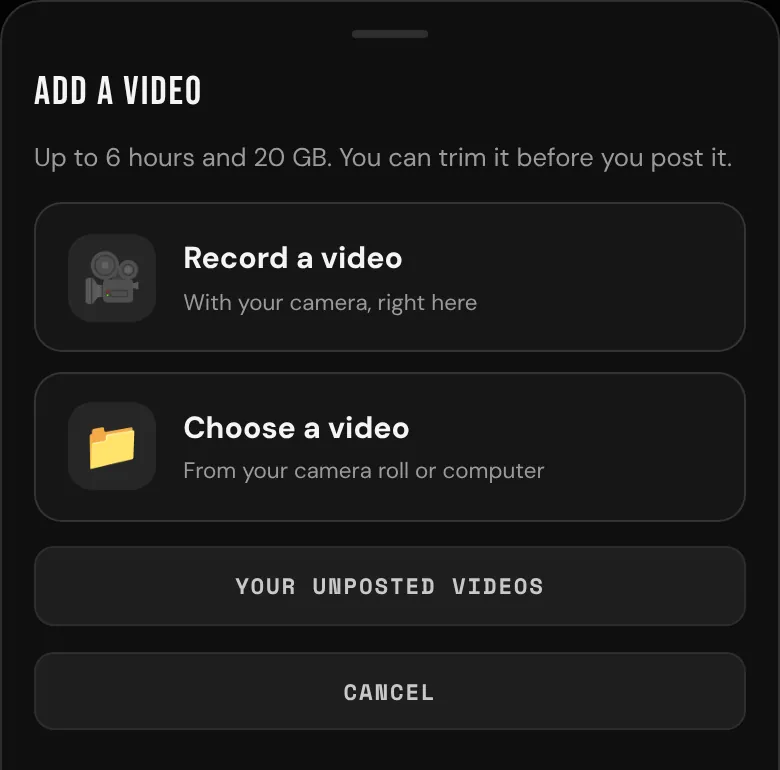
- Tap 🎥 Video. Add a video opens: "Up to 6 hours and 20 GB. You can trim it before you post it."
- Choose Record a video or Choose a video.
A post with a video can't also have photos or a poll, and it doesn't show a link preview card.
Record a video
- Tap Record a video. The camera opens (tap ⇄ Flip to switch cameras). It records with sound, for up to 6 hours.
- Tap the round button to start. You see REC and how long you've been recording.
- Tap ■ Stop when you're done. It stops by itself at the limit.
- Watch it back. If you like, choose the part to keep (see below) and tick Remove sound to make it silent.
- Tap Use this video, or Record again to start over.
A long take (over about 13 minutes) is too long to play back on your phone or computer. You see "It's too long to play back here: watch it and trim it in My videos once it's ready." Tap Use this video, and trim it later in My videos if you need to.
Nothing is posted until you tap Post. A recording you don't use is deleted after half an hour.
Choose a video from your device
- Tap Choose a video. On a phone you can pick from your camera roll (or film something new); on a computer, pick a file.
- bemy.fans takes MP4, MOV and WebM videos up to 20 GB, filmed at up to 4K.
- If you like, choose the part to keep and tick Remove sound. Then tap Use this video.
If you don't trim it, the whole video is kept. A video longer than 6 hours is fine too: you choose up to 6 hours of it to keep, for example "It's 7:12:00 long. Choose up to 6 hours to keep…"
If your browser can't show a preview of the video, all of it is used (up to 6 hours). You can still use it, and trim it later in My videos.
Choose the part to keep
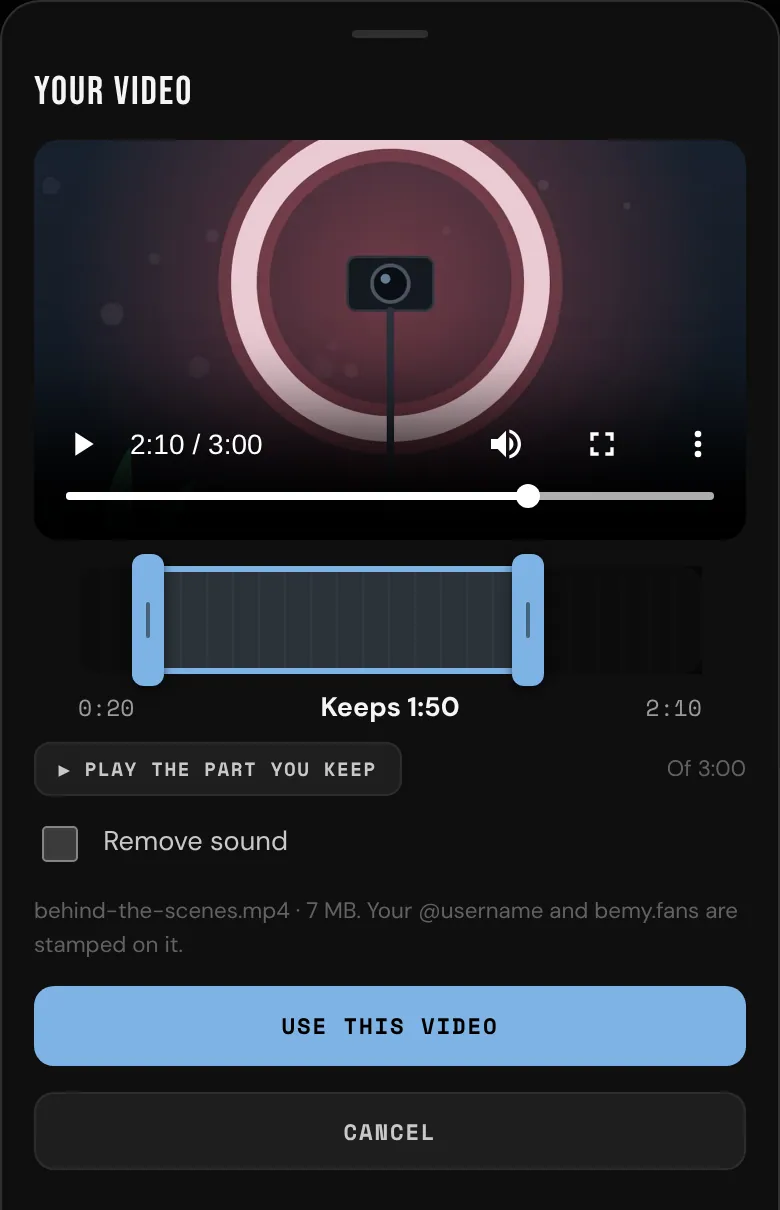
Trimming is optional. Under the video there's a timeline with a handle at each end. The part between them is what's kept, and to start with that's the whole video (up to 6 hours).
- Drag a handle to move the start or the end. The video shows that moment.
- Drag the highlighted part to move both handles together.
- Tap the timeline to move the nearer handle there.
- With a keyboard, the arrow keys move a handle by a second (10 seconds with Shift), and Page Up and Page Down move it by a minute.
- Tap ▶ Play the part you keep to watch just that part.
You see how long it is as you go, for example "Keeps 1:45". Long videos show the hours too, like 1:02:09.
Sending it
After Use this video, the post shows Uploading your video with how far it's got. A big file is sent in pieces. Keep bemy.fans open until it's sent. You can keep writing your post meanwhile, or tap Cancel to stop.
- If your connection drops, it carries on by itself when the connection is back.
- If you leave the feed while it's on its way, you'll see "Your video keeps uploading. Find it in My videos." It carries on as long as bemy.fans stays open.
- A phone may pause uploads while bemy.fans is in the background. It carries on when you come back.
If it stops part-way
If bemy.fans closes before your video is sent (or your phone sleeps for a long time), what was sent isn't lost. Add a video to a post and choose the same video again: it carries on from where it stopped, and the post shows Carrying on with your video with how far it's got, like 43%.
- Add a video shows any video that stopped part-way, for example "behind-the-scenes.mp4 stopped sending at 43%. Choose the same video to carry on from there."
- My videos shows it under On its way, with how far it got and until when it waits. Tap Drop it if you don't want it any more.
- A video that stopped waits a day for you to choose it again. After that it's dropped. The whole upload has to finish within 3 days.
If you choose a different video while one is still on its way, bemy.fans asks first, for example "behind-the-scenes.mp4 is still on its way (43% sent). Choose that video again to carry on with it, or send this one instead and drop it." Tap Send this one instead, or Keep the other one.
Getting it ready
Once it's sent, bemy.fans gets it ready (Getting your video ready). Your @username and bemy.fans are stamped on it, and anything in the file that could identify you (like where it was filmed) is removed.
- A short video takes a minute or so.
- Videos over 1 GB or 10 minutes are prepared in their own line, so short videos never wait behind them. A long one shows how far it's got, like Getting your video ready · 40%. You don't have to wait: you can leave, it's in My videos, and you get a notification, Your video is ready, when it's ready to post.
- How long a long video takes depends on the video. As a rough guide, an hour of 1080p video takes about 20 minutes, and an hour of 4K HDR video from an iPhone takes over an hour.
- If bemy.fans restarts while it's getting a long video ready, the video doesn't start over.
- If it can't be prepared, you're told why in your alerts ("Your video couldn't be prepared"). Remove it and try again, or choose another video.
Long videos play at the frame rate they were filmed at, though very high frame rates, like slow motion, come down to 30. Like every video on bemy.fans, they're at most 1280 pixels on the longer side.
Post it
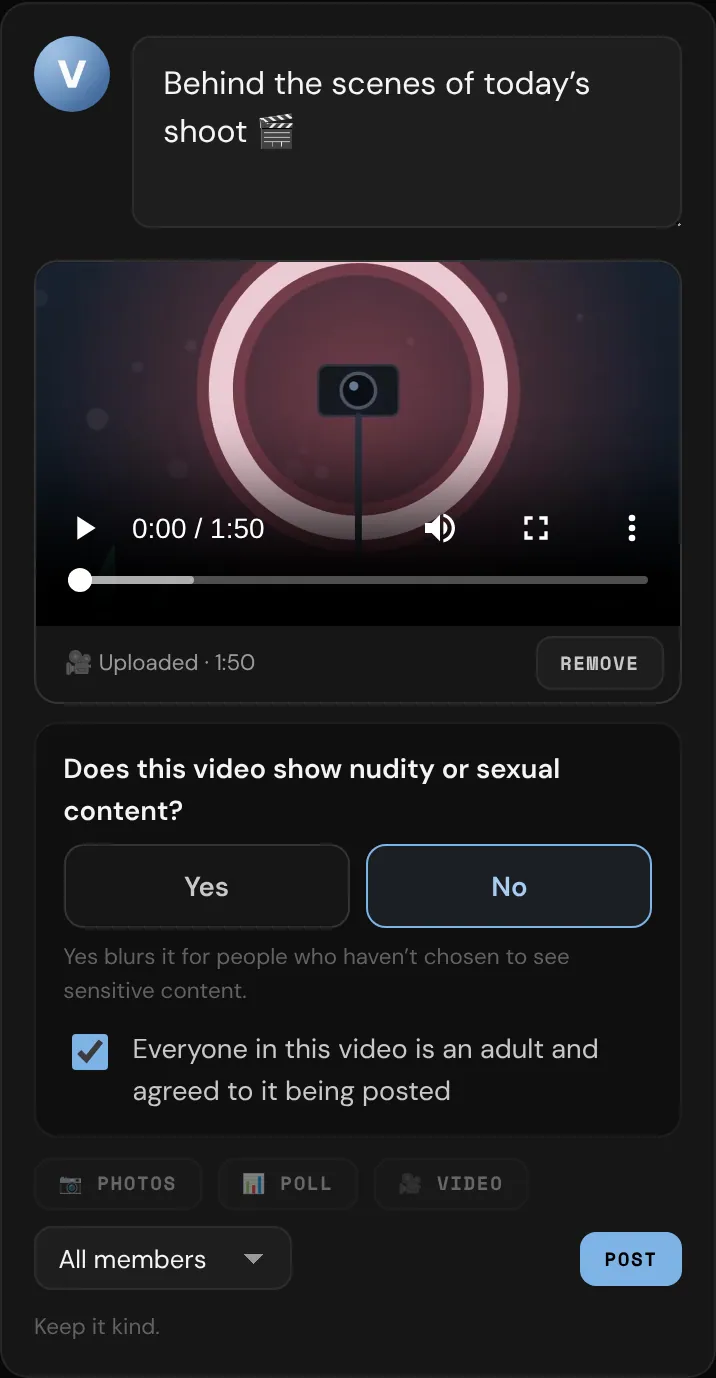
Before you post, answer two things:
- Does this video show nudity or sexual content? Tap Yes or No. If you say Yes, it's blurred for members who haven't chosen to see sensitive content, until they tap it.
- Tick Everyone in this video is an adult and agreed to it being posted.
Then choose All members or Followers only and tap Post. Once it's ready and you've answered both, Post turns on.
In the feed, a video that isn't marked sensitive shows its first frame and plays when someone taps it. Videos can't be downloaded from the feed, and they can't be shared to X or Bluesky. Members who choose Show sensitive photos without blur in Settings see sensitive videos without the blur too, and Blur all images on a device blurs every video. See Privacy and safety.
My videos
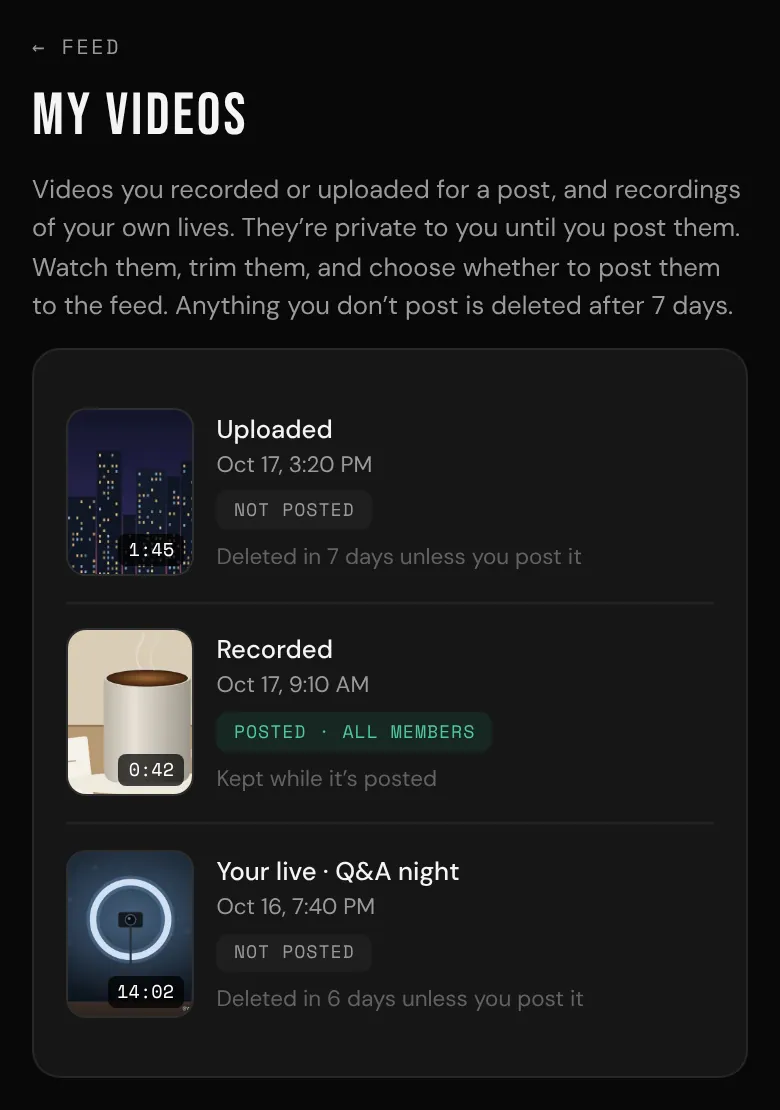
Videos you've recorded or chosen but haven't posted wait in My videos: tap Your unposted videos after 🎥 Video, or open My videos from More, from your Home, or from the Live page. Recordings of your own lives are there too (see Record your live).
- Each one says Recorded or Uploaded, and whether it's posted. A long video shows Getting it ready · 40% (or however far it's got) until it's ready.
- A video that stopped sending part-way shows under On its way (see If it stops part-way above).
- Open one to watch it, trim the start or end, post it (with the same two questions), download it (Plus and Pro) or delete it.
- Videos you don't post are deleted after 7 days. You can have up to 10 unposted videos at once.
- Deleting a post puts its video back in My videos for another 7 days. If a bemy.fans moderator takes a video off the feed, it can't be posted again.
If you switch to a fan account, your videos wait in My videos, but you can't post them: opening one says "Posting videos is for creators. Switch to a creator account to post this one."